
How to Share a Course by Link and Track Completion Without an LMS
Short answer
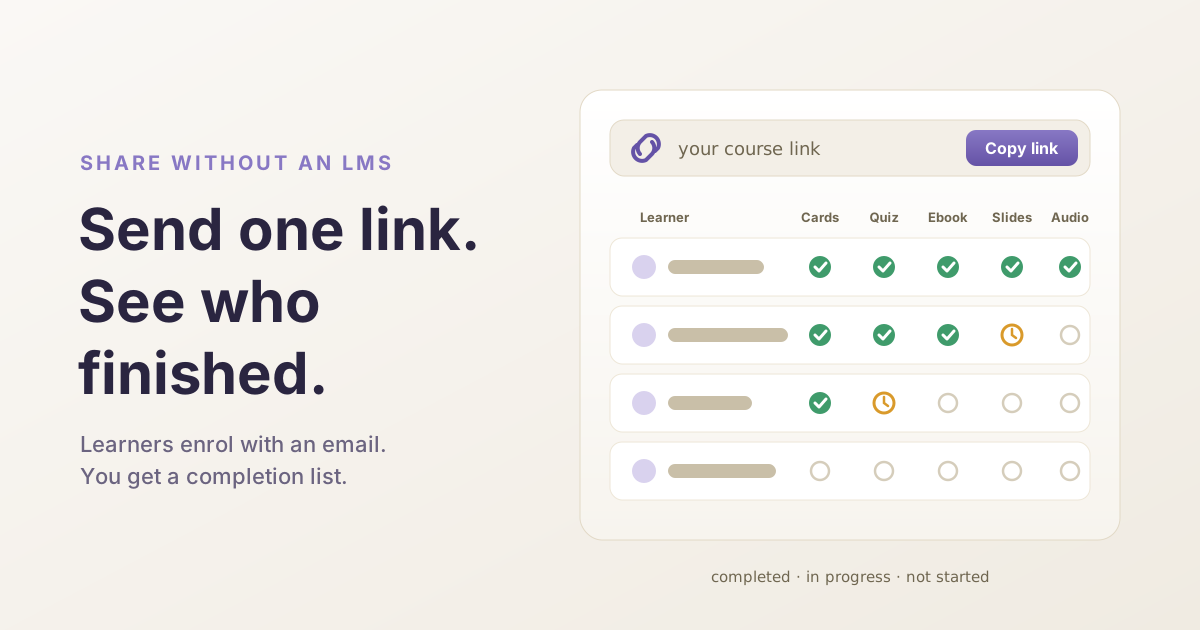
To share a course by link and track completion without an LMS, publish a HippoKit kit as a tracked link and send it to your group. Learners enter an email to start; they do not need an account. A sharing dashboard then lists each learner and which formats they have started or completed, and exports to CSV.
When is a link enough, and when do I need an LMS?
A link is enough when the question you need answered is simple: did the eight people in Thursday's workshop go through the pre-reading, and how did they do on the quiz?
For that, a learning management system is a lot of machinery. A tracked course link gives you the list and very little else. The rest of this post describes exactly what it records, so you can judge whether that is enough for your group. There is a shorter overview on the share training without an LMS page.
How do I publish a kit as a course link?
- Make or open a kit. A kit is a set of study formats built from a topic or a document. Formats arrive in 1–5 minutes: flashcards and the quiz in about a minute, slides and audio closer to five. If you have not seen one, the gallery has samples.
- Review it before anyone else sees it. The content is AI-generated and it can be wrong. Read the ebook, take the quiz yourself, and fix what is off. You can edit ebook paragraphs, slides, quiz questions and flashcards directly in the viewer on every plan.
- Open the Share menu on the kit page and choose "Publish tracked link". The kit has to have finished generating.
- Give the link a title and, if you like, a short description. The title starts as the kit's topic. Learners see both before they type their email, so this is the place for "Complete the quiz before Thursday's session".
- Select "Publish link", copy it, and send it yourself. Email, chat, a calendar invite: whatever your group already reads. HippoKit does not send the invitation for you.
Each time you publish, you get a new link with its own learner list, so you can publish one link per cohort and keep the groups apart. And the link points at the kit itself, not a copy. If you fix a typo after sending it, learners see the fix.
What does a learner have to do to enrol?
The learner opens the link and sees your title and description, an email field, and a consent box. The box says their email and their progress in the course are shared with the course owner. They tick it, select "Start course", and the material opens. There is no password and no account.
A few honest points about that step:
- The email is not verified. No confirmation message is sent. The address is stored as typed, so a typo shows up in your list as a different learner. Your list is as reliable as the addresses people enter.
- Returning is easy. The same browser is remembered for 30 days. On a different device, entering the same email picks up the same progress.
- Test it in your learners' browsers first. The course page remembers a learner with a cookie set by a different web address from the page itself. Browsers that block third-party cookies, which includes Safari on iPhone and Mac by default, may not get past the email step. We have not verified every browser, so open your link on a phone before you send it to a group.
- A whole room enrolling at once may hit a limit. Enrolment attempts from one network are rate-limited to block abuse. If a group on the same network all sign in together, a few people may need to try again a minute later.
- Learners study in the browser. The slide and audio download controls you see as the owner are not shown on the course page. The quiz is an exception: it keeps its PDF link, and on a public kit that opens a printable copy with the answer key. Do not treat the quiz score as a test result.
- Learners can leave. The course page has a "Remove my data" button. It takes their email off the course and signs them out of it.
What does the completion list show?
Open the Share menu again and choose "Sharing dashboard". For each link you see how many people enrolled and how many completed each format. Below that is a table with one row per learner: their email, the date they enrolled, a marker for each format (completed, in progress, or not started), and total time.
The "Export CSV" button downloads the same list as a file. It adds the scores: for the quiz, the score and the number of questions; for flashcards, how many cards the learner rated Good or Easy (counted as known) and Again or Hard (not known). Only numbers are kept. Learner answers are not stored.
No other HippoKit user can open this list.
What counts as "completed"?
There is no single "finished the course" flag. Completion is recorded for each format separately, and a format counts as started when its tab is opened. The first tab opens automatically, so every enrolled learner shows the first format, usually the ebook, as in progress.
| Format | Counts as completed when | Score recorded |
|---|---|---|
| Flashcards | every card has been rated | cards known and not known |
| Quiz | the results screen is reached | score and total |
| Ebook | the learner reaches the final chapter | none |
| Slides | the learner reaches the last slide | none |
| Audio | playback reaches the end | none |
So decide which format is your yardstick and say so in the link description. For most groups the quiz is the useful one, because it carries a score. If a learner retakes the quiz, the newer score replaces the older one. A completed format stays completed.
Be realistic about what this proves. Reaching the last slide is not the same as reading the slides. The time figure runs from opening a format to completing it, so it is rough. And progress is reported in the background: if a learner's connection drops at the wrong moment, a completion can go unrecorded. Treat the list as a good indication that someone went through the material, not as evidence of what they learned.
Is a shared course private?
Not by default, and this is easy to miss. Kits are public by default. A public kit has its own public page that anyone can open without enrolling, and public kits can be listed in the site's sitemap, so search engines can find them.
The tracked course page is separate. It is marked as not for indexing and is excluded from the sitemap. But it shows the same material as the public kit page.
If you want the tracked link to be the only way in, open the Share menu, choose "Public link & visibility", and switch the kit to Private. The public page then stops working for everyone; you still open the kit from your library, and the tracked link keeps working for your learners. One thing does break: print views, including the quiz's PDF link, only work while the kit is public. Either way, do not put confidential material in a kit you have left public.
You are also collecting email addresses, which makes you responsible for them. You can remove an individual learner from the dashboard, and learners can remove themselves. Either way the email is erased and the row shows as "(removed)". Removed rows are scheduled for permanent deletion after 30 days, after which the enrolled count can be higher than the number of rows listed.
One more limit: the app currently has no control for closing a link or giving it an end date. Assume a link you publish stays live, and write to hello@hippokit.ai if one has to be closed.
What does an LMS do that this does not?
Quite a lot, and for some work those things are the whole point.
- Compliance records. Verified identities, sign-in through your organisation, and records that hold up when someone audits them.
- Standard course packages. SCORM and xAPI content will not run here, and HippoKit does not export to those formats.
- Certificates, grading and pass marks. There is no certificate, no gradebook and no pass or fail.
- Assignment and chasing. No due dates, no automatic reminders, no enrolling people from a staff list.
- Scale. Departments, roles, managers who see their own team, reporting across many courses.
If you need any of those, use an LMS. It is the right tool for regulated training, for content you have already bought as packages, and for large organisations. A tracked link fits the other case: one trainer, one group, and a need to know who did the work.
What does it cost?
Publishing a tracked link is not tied to a paid plan, and learners pay nothing. What your plan changes is what goes into the kit. Flashcards, the quiz and the ebook are on every plan. Slides and audio are on Plus and up, along with their PPTX and MP3 exports. PDF upload works on every plan but needs an account; Word and PowerPoint upload are on paid plans. The Free plan has 60 credits a month. Current numbers are on the pricing page.
Try it with one small group
Pick a session you are already running. Make a kit from the handout, check it, publish a tracked link, and ask the group to finish the quiz beforehand. You will know within a day whether a list like this is enough for you.
Create a free account. No credit card required.
— The HippoKit Team