
One source.
The whole learning kit.
Turn a topic, PDF, Word or PowerPoint file into editable slides, an ebook, a quiz, flashcards and narrated audio — to teach a group or to study yourself.
AI flashcard, quiz, study guide, slide, and audio generator — from a topic, PDF, Word doc, or PowerPoint.
One free kit — sign in to save it and build more.
- Editable PowerPoint export on paid plans
- Edit one item without regenerating
- Share a link and see who finished
- Unused credits roll over on paid plans

Teach a group, or study for yourself
Teaching or training others
Turn your deck, manual or notes into a kit your learners can actually use — then hand it over.
- Editable PowerPoint slides in a theme that fits your audience (Plus and up)
- A course link learners enrol in, with a list of who finished each format
- Change one slide or question without regenerating the rest
Studying for yourself
Preparing for an exam or a certification? Start from the syllabus or your notes.
- Flashcards you rate as you go, with a review schedule kept per card
- Scored quizzes with an explanation for every answer
- Free samples from a typed topic, before you spend a credit
Watch one topic become a kit
A 69-second recording of a real kit on software design principles, from the form to the downloads.
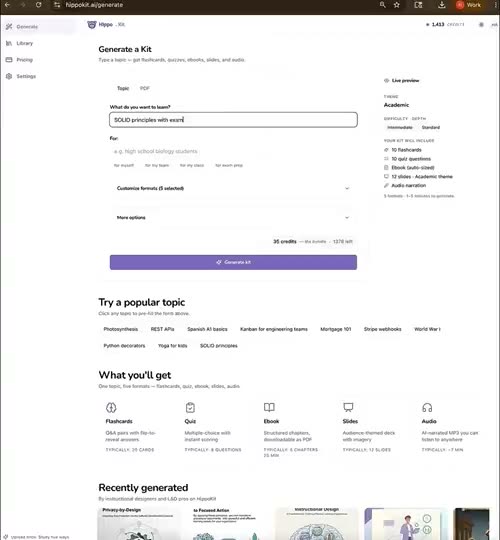
One form. Type a topic, say who it is for, choose formats and a slide theme.
Ebook. Chapters with a table of contents and an illustration for each.
Flashcards. Cards drawn from the same material, ready to review.
Quiz. Pick an answer and read why it is right or wrong.
Audio lesson. A narrated lesson with its transcript underneath.
Slides. A themed deck, then PDF, PowerPoint and MP3 downloads.
Already have the material? Start there.
Drop in a PDF, Word doc, or PowerPoint and HippoKit reads it, then builds the same five study formats — flashcards, a scored quiz, a formatted ebook, an audience-themed slide deck, and an AI-narrated audio lesson — in one pass. No copy-pasting, no re-typing.
Textbooks, papers, reports, manuals — turned into a study kit.
Word (.docx)
Course notes and training docs become flashcards, a quiz, audio.
PowerPoint (.pptx)
Re-cut an existing deck into a quiz, ebook, and audio recap.
Free includes PDF upload. Word and PowerPoint uploads are on paid plans.
Five formats from one source
Stop switching between Quizlet, Gamma, Gemini Notebook, and ChatGPT. HippoKit generates all your study materials in one place.
Interactive Flashcards
Flip cards with Q&A pairs and rate each one. HippoKit keeps a spaced-repetition schedule for every card, and a connected AI assistant can serve the cards that are due. Keyboard navigation for speed.
Scored Quizzes
Multiple choice with instant scoring and detailed explanations per question.
Formatted Ebooks
Structured study guides with chapters, table of contents, and downloadable PDF.
Audio Lessons
Listen to AI-narrated study content. Adjustable speed. Download as MP3.
Plus and up
Audience-themed Slides
Polished decks with audience-specific themes — playful for kids, executive for the boardroom — with AI imagery, charts, and diagrams.
Plus and up
Export per format
PDF for ebooks, slides, flashcards and quizzes. Editable PowerPoint (PPTX) for slides and MP3 for audio on paid plans. Take any format with you.
Personal Library
All generated content saved automatically. Search, filter, and access anytime.
Direct it, and make it yours
Revise by chatting
Not quite right? Tell HippoKit what to change in plain language — 'simplify this slide,' 'add an example' — preview the exact diff in the docked Design/Revise workspace, then apply. Plus and up.
Edit right in the viewer
Fix a typo or reword a quiz question, flashcard, ebook paragraph, or slide inline, with no full regeneration. On Plus and up you can also ask AI to revise just that item.
Tuned to you
Flip on 'Tune for me' and kits adapt to your role, level, and goals — while the facts stay neutral. Review or delete what HippoKit learns, anytime.
Free samples first
Starting from a typed topic, see a few sample items for a format and steer them before you generate the full kit. Sampling costs no credits.
Built from your own material
Upload a document and the kit is written from its content. AI can still get things wrong — review before you share.
PDF on Free; Word and PowerPoint on paid plans
Hand it over, or keep it for yourself
Share a link, see who finished
Publish a kit as a course link. Learners enrol with an email, and you see who started and who completed each format. No LMS to set up.
Submit your kit to the gallery
Proud of a kit? Submit it to the public gallery, under your name or anonymously. It appears after admin approval.
Works inside your AI assistant
Connect HippoKit to Claude, ChatGPT, Gemini or Cursor and generate kits without leaving the conversation. Uses your credits.
Credits that roll over
On paid plans, unused monthly credits carry into the next cycle, up to one month's pool. Top-up credits do not expire.
Free samples, before you spend a credit.
Preview a free sample of your kit — three flashcards, three quiz questions, an ebook chapter list, or a slide outline. Rate each question too easy, about right, or too hard — or keep, cut, and edit outline rows — and the next round adjusts. When it's right, generate the full kit anchored to the samples you approved. Sampling is free on every plan.
3 free rounds on Free · 5 on every paid plan. Get started free
Not quite right? Just say so.
Tell HippoKit what to change in plain language and it revises that section in place — you preview the exact diff before anything changes. Plus and up.
Photosynthesis converts radiant energy into chemical energy stored in glucose.
Plants use sunlight to turn water and air into their own food (sugar).
Preview the diff, then apply — nothing changes until you approve it.
Send one link. See who finished.
Publish a kit as a course and share its link with your group. It is a light way to hand over training — it is not an LMS and does not export SCORM.
- Learners enrol with an email — they do not need a HippoKit account.
- You see who enrolled and, format by format, who started and who finished.
- Learners can remove their email from a course at any time.
Comparing tools?
Already using Gemini Notebook?
Gemini Notebook (formerly NotebookLM) is a source-grounded workspace you study inside. HippoKit builds one kit — slides, an ebook, a quiz, flashcards and audio — that you hand to learners, with a link that shows who finished. They sit at different points in the same workflow. See the honest head-to-head.
HippoKit adds a free Taste Test: react to sample questions and recalibrate before generating — Gemini Notebook sets difficulty upfront, with no sample loop.
Compare HippoKit vs Gemini NotebookIntegrations
HippoKit lives where your AI assistant lives.
Generate flashcards, quizzes, ebooks, slides, or audio from Claude Desktop, ChatGPT, Gemini, or Cursor — same content, same quality, just routed through whichever interface you're already in.
Pay for what you use.
Format-weighted credits. No surprise bills. Save 17% with annual billing.
Every plan includes free Taste Test samples.
Free
Try the format mix on a real topic.
60 credits / month
- Flashcards, quizzes, ebooks
- PDF source: ~30 pages
- PDF export
Plus
Solo creators producing weekly study content.
150 credits / month
- All 5 formats (slides + audio)
- PDF source: ~100 pages
- Email support
Premium
Power users and small teams.
500 credits / month
- All 5 formats
- PDF source: ~150 pages
- Priority email support
Studio
Power users + small teams across all 5 formats.
1,500 credits / month
- Premium-model opt-in (Opus, Gemini 3 Pro)
- Priority generation queue
- 1,500 credits / month
- Bulk export tools
Enterprise
Schools, training orgs, corporate L&D.
Custom credit pool
- Everything in Studio
- SSO + admin dashboard (planned)
- Dedicated CSM
See the full credit-cost table, FAQ, and annual pricing on
Turn any document into a study kit
Can I turn a PDF into flashcards and a quiz?
Yes. Upload a PDF and HippoKit reads it, then generates flashcards, a scored quiz and a formatted ebook in one pass, plus an audience-themed slide deck and an AI-narrated audio lesson on Plus and up — each exportable. PDF upload is available on every plan, including Free.
Does HippoKit work with Word documents and PowerPoint files?
Yes. HippoKit accepts Word (.docx) and PowerPoint (.pptx) uploads alongside PDFs and a typed topic. Drop in an existing training doc or slide deck and it becomes the same five study formats. Word and PowerPoint uploads are on paid plans; PDF is on Free.
What can I use as a source?
A typed topic, or an uploaded document — PDF, Word (.docx), or PowerPoint (.pptx). HippoKit turns any one of those into flashcards, a quiz and an ebook — and, on Plus and up, an audience-themed slide deck and an audio lesson — generated together in a single step. PDF upload is on every plan; Word and PowerPoint uploads are on paid plans.
Can I preview content before spending credits?
Yes — every plan includes the Taste Test. Before generating a full kit, preview a free sample at your settings: three flashcards, three quiz questions, an ebook chapter list, or one slide outline. React to each item and the next round adjusts; you get 3 free rounds per kit on Free and 5 on every paid plan. When a sample looks right, generate the full kit anchored to it — no credits are spent until then.
Can I edit or revise an AI-generated study kit?
Yes — two ways. Edit quiz questions and flashcards inline right in the viewer (fix a typo, or ask AI to revise just that item — no full regeneration). And on Plus and up, HippoKit's assistant revises any section from a plain-language request, with the exact diff previewed before it is applied.
Can HippoKit personalize content to me?
Yes. Turn on 'Tune for me' and generated kits adapt to your role, level, and goals while keeping the underlying facts neutral. You can also opt in to let HippoKit learn from your history, and review or delete what it learns at any time.
Will the slides open in PowerPoint?
Yes. On Plus and up, a slide deck downloads as an editable PowerPoint (.pptx) file you can open and change in PowerPoint, and as a PDF. Slides are not included on the Free plan.
Is a kit accurate to my source?
When you upload a document, the kit is written from its content rather than from a bare topic. It is still AI-generated and can contain mistakes, so review a kit before you teach from it or share it. You can fix any item inline without regenerating the rest.
What does a kit cost, and do credits expire?
Each format costs credits: flashcards 1, a quiz 2, an ebook 12, audio 6, slides 20; all five together are 34. The Free plan has 60 credits a month. On paid plans, unused monthly credits roll over to the next cycle, up to one month's pool, and top-up credits do not expire.
Can I see who finished a kit, or send it to my LMS?
You can share a kit as a course link: learners enrol with an email, and you see who started and who finished each format. There is no single course-level score. HippoKit does not export SCORM or xAPI and does not connect to an LMS.
Make your first kit now
Type a topic and get flashcards, a quiz and an ebook without signing up. A free account gives you 60 credits a month. No credit card.