
HippoKit is now invokable from Claude Desktop, ChatGPT, Gemini, and Cursor
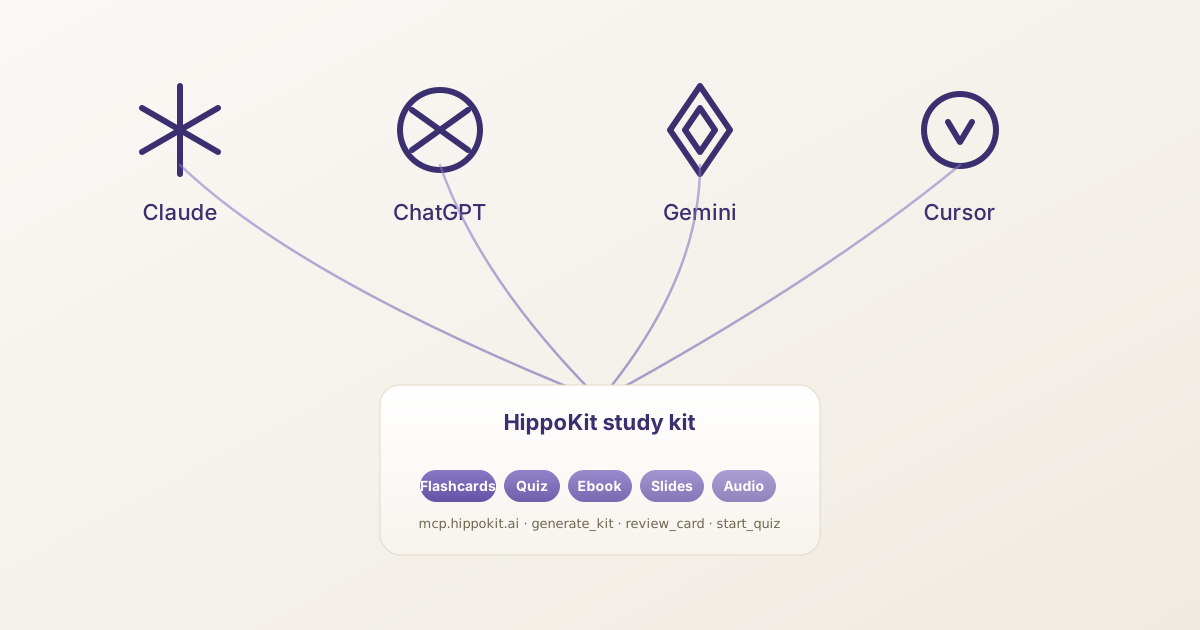
The interface for learning is moving
Most of the conversations our team has with instructional designers, L&D pros, and serious self-directed learners now start the same way: "I do most of my thinking inside Claude / ChatGPT / Gemini now. Can your tool just live there?"
The honest answer for the last year was no. You generated a study kit in HippoKit. You opened your AI assistant in another tab. Different sessions, different state, no spaced-repetition memory carrying across.
Today we're fixing that. HippoKit is now invokable from Claude Desktop, ChatGPT Connectors, Gemini Extensions, and Cursor MCP through a shared, open standard called the Model Context Protocol. Connect once. Then ask any of those hosts to generate a study kit, surface a card that's due now, or run a quick quiz against a kit you generated last week — without leaving the conversation you're already in.
This is the most significant interface change we've shipped since launch.
See it in 60 seconds
A real session, recorded end-to-end inside Claude Desktop:
You: Generate flashcards on photosynthesis using HippoKit. Claude: [calls generate_kit] Here's your kit: hippokit.ai/kit/<id>. 24 cards covering the light-dependent reactions, the Calvin cycle, electron transport, and the role of chlorophyll. Want to start a study session? You: Show me a card that's due now. Claude: [calls get_due_cards] Front: What's the net energy yield per molecule of glucose oxidised under aerobic respiration in eukaryotic cells? You: Press Reveal. Score yourself. Again. Claude: [calls review_card] Got it. I've updated your spaced-repetition schedule — this card is back in your queue in about 24 hours.
The full demo video is embedded above. The whole loop takes under 60 seconds.
What Model Context Protocol actually is
Model Context Protocol — MCP — is an open standard, originally proposed by Anthropic, for letting AI assistants call external tools in a structured, auditable way. Think of it as USB-C for AI: a single connector that works across hosts.
Before MCP, every AI assistant had its own bespoke plugin or extension format. Builders had to ship four or five wrappers to cover Claude, ChatGPT, Gemini, and the rest — or pick a favourite host and abandon the others. MCP collapses that surface into one server you build once. Any host that speaks the protocol can invoke your tools.
The protocol went from spec to widely-adopted standard fast. Anthropic, OpenAI, and Google all support it. Cursor, Smithery, Glama, MCP.so, and PulseMCP curate growing directories of MCP servers. Five-figure numbers of MCP integrations now ship from independent builders. The interface layer for AI tooling is consolidating around this protocol.
HippoKit fits naturally as an MCP server. Our product was always about structured outputs — five distinct formats, spaced-repetition state, exportable kits. Those are exactly the shape MCP wants: typed inputs, typed outputs, callable from any compliant host.
What you can do from your AI assistant
We exposed nine tools at launch, grouped by what you actually want to do.
Generate
generate_kit— Type a topic (or hand it a document — PDF, Word, or PowerPoint), get a full study kit back. All five formats — flashcards, quizzes, ebooks, audience-themed slide decks, AI-narrated audio — same as the web app, and with the same plan limits (slides and audio are on Plus and up).
Browse
list_my_kits— Show every kit you've ever generated, newest first.get_kit— Pull up one kit's full contents inside the assistant.search_public_kits— Search HippoKit's curated public gallery without leaving the chat.claim_preview_kit— Convert an anonymous preview kit into a permanent kit on your account (limited demo on the free tier; full access on every paid plan).
Study, with real spaced repetition
get_due_cards— "What should I review right now?" The assistant pulls the cards your FSRS-6 schedule says are due, regardless of which surface you generated them on.review_card— Mark a card Again / Hard / Good / Easy, and the schedule updates server-side. Tomorrow you can pick up where you left off from the web app, or back inside Claude. State follows you.start_quizandanswer_quiz_question— Multi-question quiz sessions with scoring, surfaced inside the assistant the same way a regular conversation would feel.
The spaced-repetition piece matters more than it sounds. Most "ask an AI to quiz me" workflows are stateless — the assistant forgets every prompt the moment the conversation ends. HippoKit's MCP server writes your review state to the same database the web app uses. The 24-hour scheduling, the difficulty calibration, the long-tail retention curve — all of it persists. Whether you reviewed a card inside Claude Desktop or on hippokit.ai, the next time you ask for cards-due-now, you get exactly the cards the algorithm says you should.
Set it up in 30 seconds
The full host-by-host guides live at hippokit.ai/docs/mcp. The shape is the same for every host:
- Generate a Personal Access Token at hippokit.ai/settings/mcp. The token shows once at creation — save it, then never see it again.
- Open your host's connector / extension settings. Claude Desktop: Settings → Connectors. ChatGPT: Settings → Connectors (currently rolling out across Plus / Team / Enterprise / Edu). Gemini: Extensions. Cursor: Settings → MCP.
- Paste the connection URL (
https://mcp.hippokit.ai/mcp) and the token you just generated. - Approve the connection when the host asks for permission.
- Test it. "Generate flashcards on quantum mechanics using HippoKit."
If something goes wrong, the per-host guides have the most common failure modes — Cursor's red status dot, ChatGPT's beta-rollout gating, Gemini's feature-flag rollout — and how to fix each.
What's next
This is Phase 0 — the protocol layer. The next two phases are:
Phase 1 — Closed beta, more hosts, OAuth 2.1. Self-service Personal Access Tokens are working today; OAuth 2.1 with PKCE and Dynamic Client Registration is the more polished version for hosts that prefer it. We'll also be onboarding more MCP-compatible hosts as they ship — Windsurf, Zed, the open-source agent frameworks.
Phase 2 — The B2B story. The same kit content that powers your study session is the same content an L&D team uses to train new employees, and the same content their internal AI agents need to be evaluated against. We're working with a small group of L&D design partners to build the team-onboarding and agent-competency-evaluation surfaces. If you run a learning programme at a 50- to 500-person company and want early access, reply to this post or write to us at hello@hippokit.ai.
We don't have a public roadmap commitment on per-host rich cards (Apps SDK on ChatGPT, widget SDKs on Gemini) yet. The Phase 0 surface is deliberately spec-compliant and host-agnostic — it works the same everywhere — and we want to see real usage data before investing in per-host polish.
Try it now
If you're already a HippoKit user, you have access today on every paid plan:
- hippokit.ai/settings/mcp — issue a token
- hippokit.ai/docs/mcp — pick your host's setup guide
- Connect, ask for a kit, study a card. Whole thing under a minute.
If you're not yet a HippoKit user, the free tier includes an anonymous demo through the MCP surface — capped, watermarked, and metered against a small monthly company-wide budget so the door stays open without anyone abusing it. Or sign up here and start with the regular free tier.
We built HippoKit because the L&D community needed a deliverable layer that produced real, shareable multi-format learning artifacts — not just chat responses. Adding MCP doesn't change that mission. It means the deliverable layer now lives wherever you already think.
Thanks for reading. If you ship a kit you're proud of from inside Claude or ChatGPT or anywhere else, we'd love to see it.
— The HippoKit Team